
The 9 core technologies of AI agent architecture design include: AI Agent, Agentic AI, Workflow, RAG, Fine-tuning, Function Calling, MCP, A2A, and AG-UI. Below are the detailed analysis.
Core Technology 1: AI Agent
An AI Agent is an autonomous software entity capable of perceiving its environment, reasoning, making decisions, and taking actions.
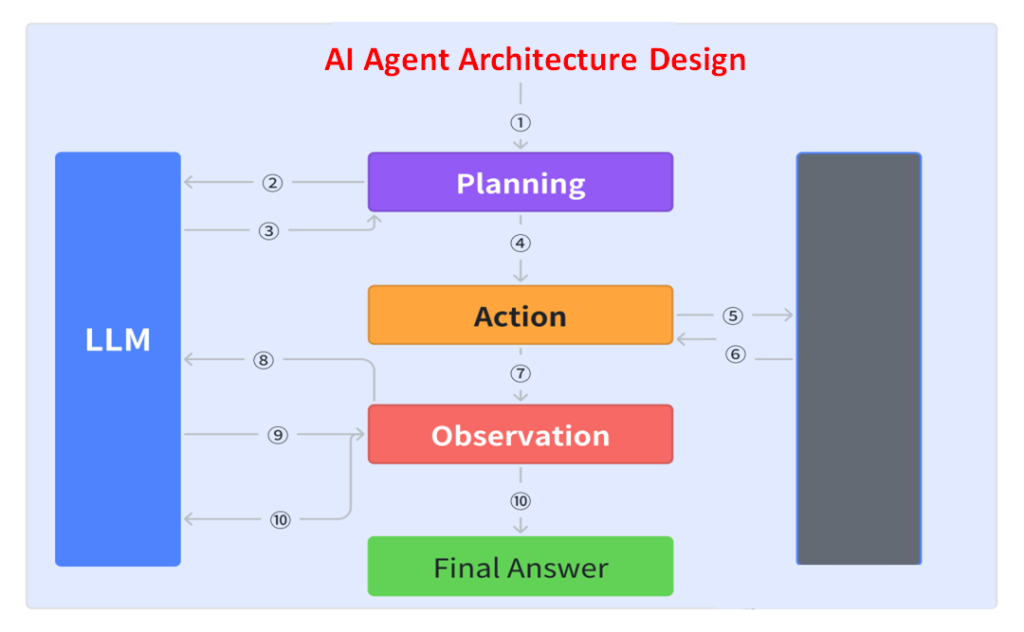
It can be compared to a highly efficient personal assistant—not only executing commands but also understanding task context, planning execution strategies, and adapting flexibly when challenges arise.
Key components include:
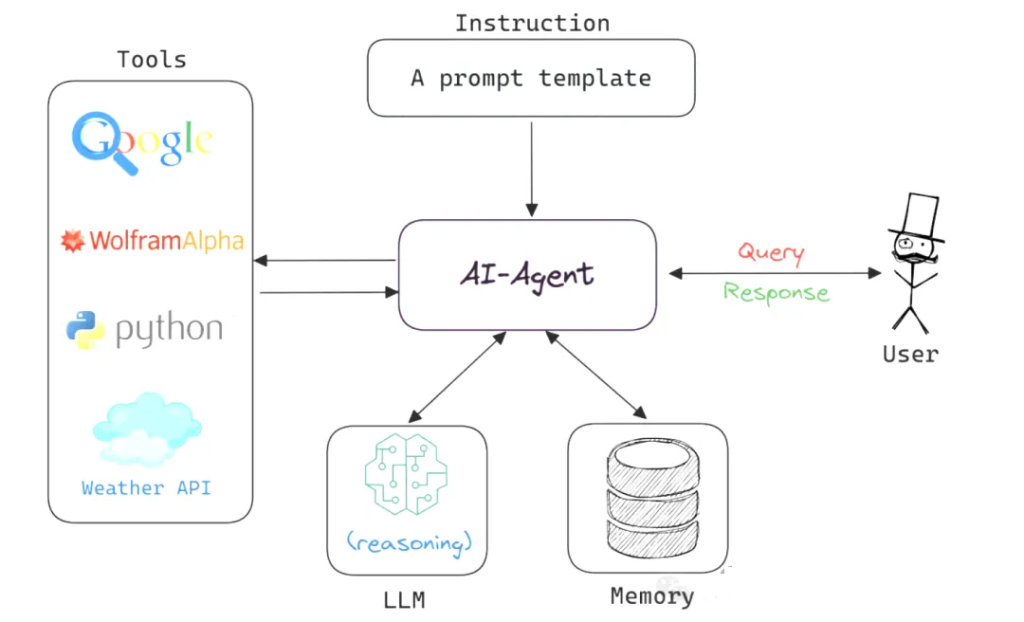
- Prompt: Instructions guiding the LLM, defining which “tools” it can use. Output is usually a JSON object describing the next step in the workflow, such as a tool call or function call.
- Switch Statement: Parses the JSON returned by the LLM to decide subsequent actions.
- Accumulated Context: Records executed steps and results, providing the basis for decision-making.
- For Loop: Drives repeated execution until the LLM returns a termination signal (e.g., a “Terminal” tool call or a natural language response).
This design allows agents to execute tasks efficiently while maintaining flexibility and adaptability.
Core Technology 2: Agentic AI
Agentic AI introduces a new paradigm: instead of a monolithic AI agent, multiple agents collaborate, supporting dynamic task decomposition, persistent memory, and advanced orchestration.
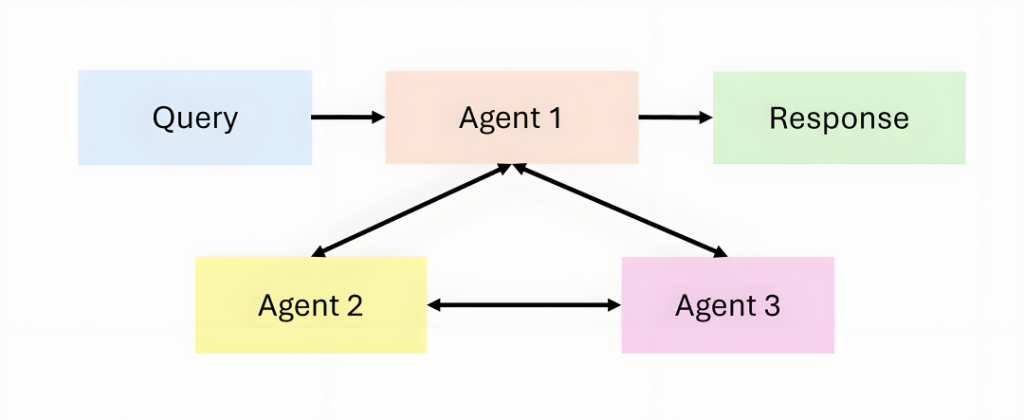
If an AI agent can be likened to a solo performer, then Agentic AI is like a symphony orchestra. In an Agentic AI system, each agent has its own unique role and capabilities; they can collaborate, share information, and dynamically adjust strategies according to task requirements. This collaborative model enables the system to handle complex tasks that go beyond the capabilities of any single AI agent.
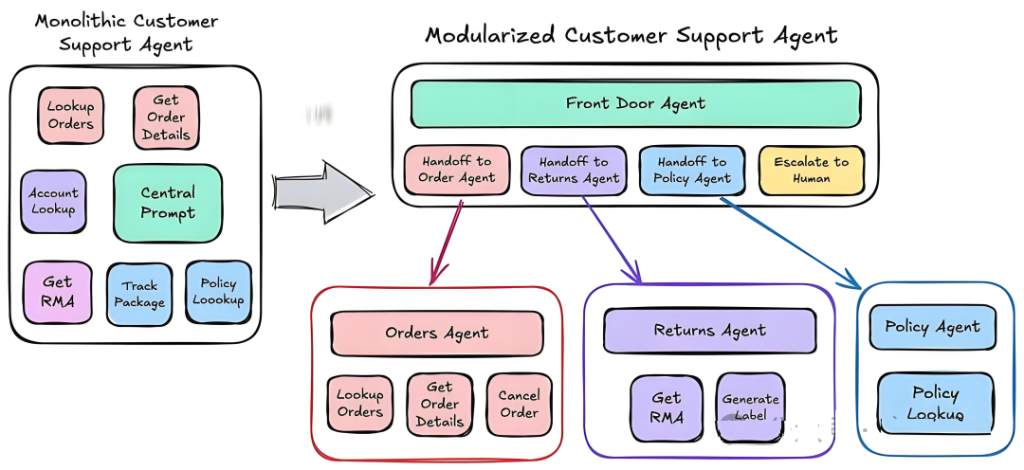
The application scenarios of Agentic AI are broad and complex. In healthcare, it can coordinate multiple specialized AI systems to perform comprehensive diagnostics; in scientific research, it can organize multiple research assistants for collaborative investigation; and in robotics, it can direct multiple robots to work together. All of these scenarios demand systems with a high degree of coordination and dynamic adaptability.
Core Technology 3: Workflow
A workflow is, in fact, quite simple—it breaks down a large task into many smaller tasks, which are then completed step by step in sequence until the overall goal is achieved.
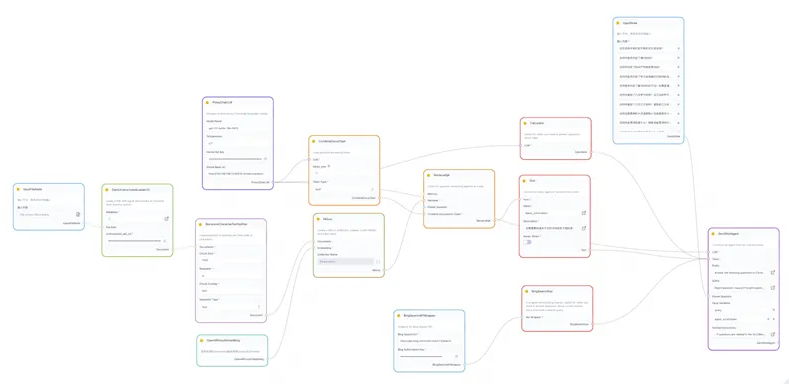
Imagine an assembly line in a factory: a large task is divided into many smaller steps, with each step handled by a dedicated person. For example, once the first person finishes their part, the work is passed to the second person, who continues, and so on, until the entire task is completed. In this way, everyone knows exactly what to do, and both efficiency and quality are improved.
In scenarios where accuracy is critical, letting an AI agent decide on its own how to execute each step may lead to errors or even unreliable results (what we call “hallucinations”). This is where workflows come into play. By predefining the task steps and having the AI agent execute them in order, we can significantly reduce the chance of mistakes.
For instance, consider an AI agent that processes orders. Once an employee enters the order information, the workflow automatically checks inventory. If stock is sufficient, the AI agent arranges shipment directly. If stock is insufficient, it creates a replenishment task, notifies the procurement department to restock, and at the same time sends a message to the customer informing them when the order is expected to ship.
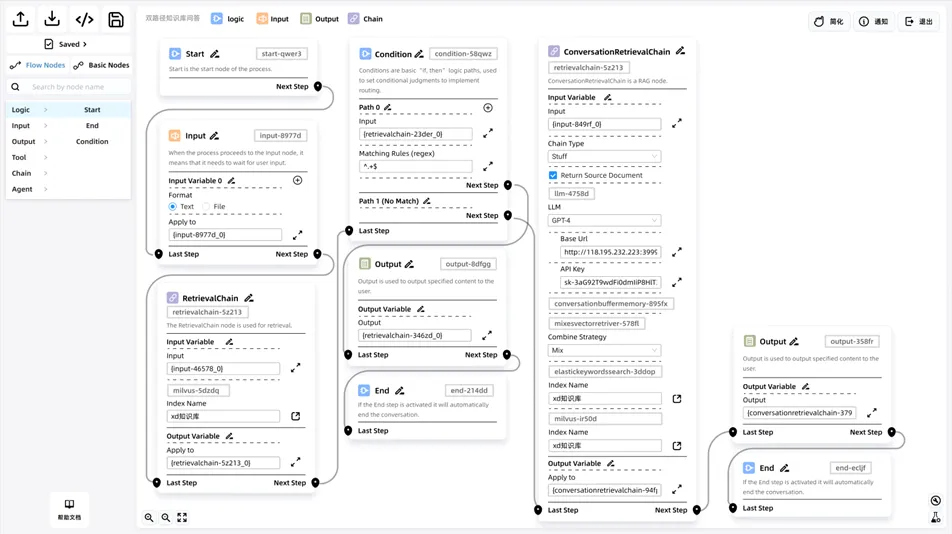
However, a workflow is not a cure-all. If it is poorly designed—for example, with too many steps or steps arranged in the wrong order—the task may become slow and inefficient. This is why skilled professionals, such as product managers, are needed to optimize and refine workflows, making them more logical and effective.
Core Technology 4: RAG (Retrieval-Augmented Generation)
RAG systems have consistently been one of the most useful technologies for enterprise AI agents.
The simplest way to design and implement a RAG architecture is as follows:
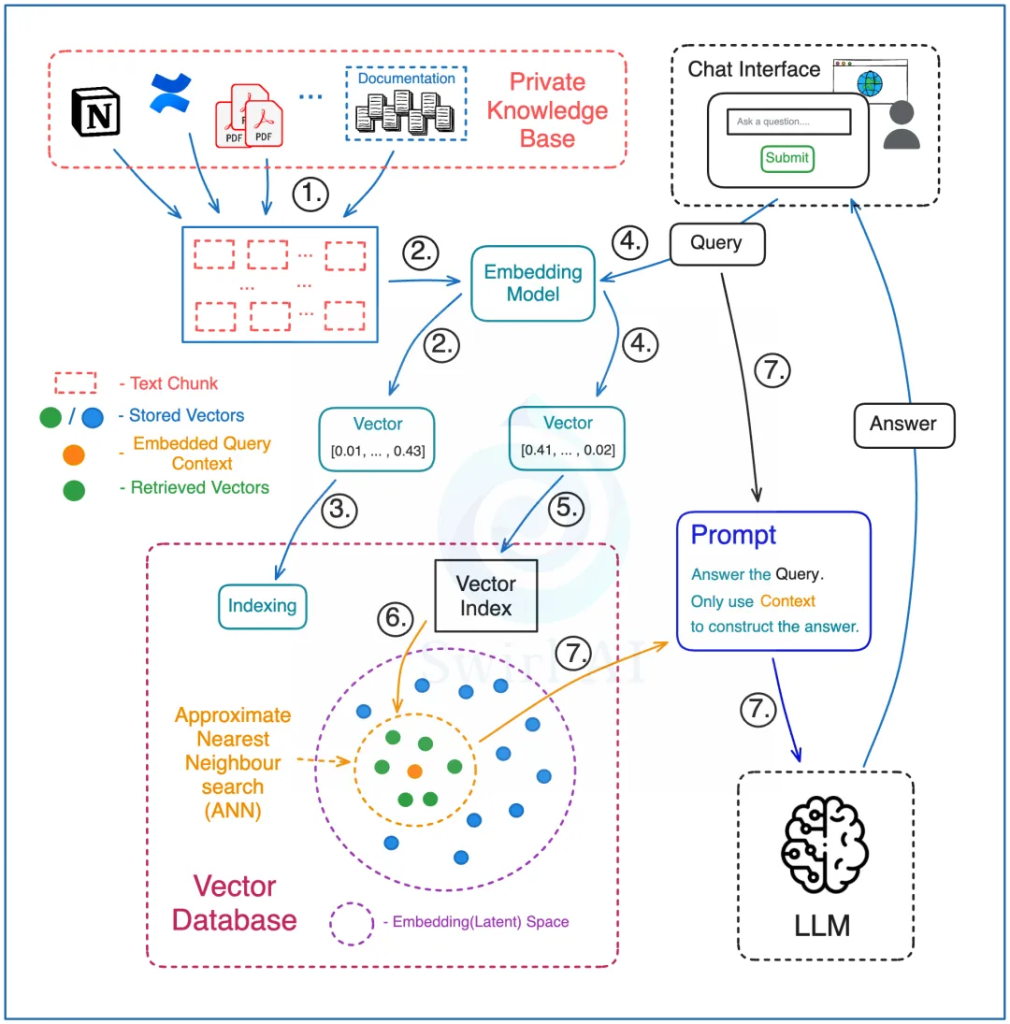
Preprocessing Stage:
- Split the entire knowledge base into small text chunks, each of which can be queried. These materials may come from different sources, such as internal company documents or PDF reports.
- Use a special model (an embedding model) to convert these text chunks into a special code (vector embeddings).
- Store these codes in a specialized database (a vector database), while also saving the original text and the links associated with each vector.
Retrieval Stage:
- In the vector database, process both the documents in the knowledge base and the user’s query with the same embedding model to ensure accurate matching.
- Run the query against the vector database index, specifying how many vectors to retrieve—this determines how much contextual information will be used to answer the query.
- The vector database performs a search to find the most similar vectors, then maps them back to their corresponding original text chunks.
- Pass both the user’s query and the retrieved text chunks into the large language model through a prompt, instructing the model to answer the question only using the provided context. This does not mean prompts are unnecessary—you must still design prompts carefully to ensure the model’s answers meet expectations. For example, if no relevant information is found in the retrieved context, the model should not fabricate an answer.
Core Technology 5: Fine-tuning
General-purpose large models are already very powerful, but when deploying AI agent applications, further fine-tuning is still necessary. The main reasons for fine-tuning can be summarized in five points:
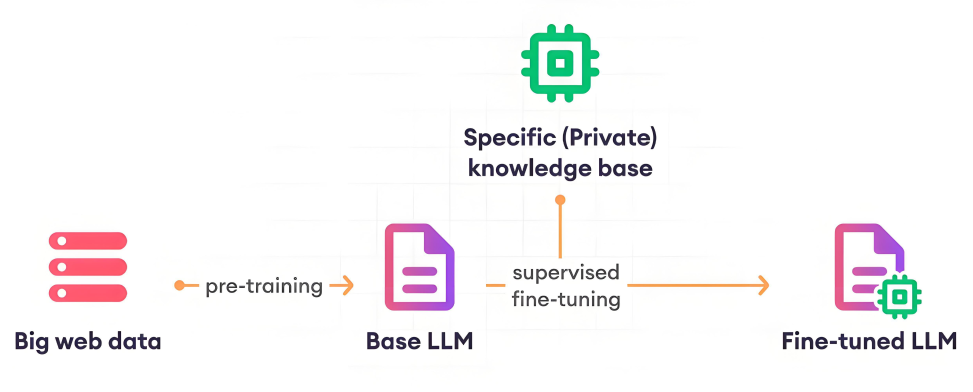
Reasons for Fine-tuning
- Large models and the human brain adopt very different strategies for processing information.
- Lack of proprietary data, such as internal enterprise data.
- Lack of up-to-date information, for example: the training data of Qwen-3 only extends up to October 2024.
- High pretraining costs, for instance: DeepSeek R1 required about USD 5 million for pretraining.
- Enhancing data security, since enterprise private data cannot be shared with third-party large models. Fine-tuning based on open-source models is the only way to meet business requirements.
Types of Fine-tuning
- Full-parameter fine-tuning
- Partial-parameter fine-tuning (also known as PEFT: Parameter-Efficient Fine-tuning)
Steps for PEFT Fine-tuning:
- Data engineering: Select and organize the knowledge required for this fine-tuning task into a dataset of Q&A pairs. The recommended dataset size is in the range of 10K–100K examples.
- Load a pretrained large model (e.g., Qwen-3-32B): Choose a pretrained model relevant to the target task and load its weights.
- Fine-tune the large model: Use the task dataset from step one as input and minimize the model’s loss function on this dataset. During this process, it is usually necessary to iterate multiple times over both the training and validation sets to avoid overfitting.
Core Technology 6: Function Calling
Function Calling, promoted by companies such as OpenAI, is a technology that allows large language models (LLMs) to interact with external tools and services through natural language instructions, effectively transforming natural language into concrete API calls. This technique solves the problem of knowledge stagnation in LLMs after training, enabling them to access real-time information such as today’s weather or stock market closing prices.
1. How It Works
The mechanism of Function Calling can be understood in five steps:
- Identify the need: The LLM recognizes that a user’s query requires calling an external API to obtain real-time information. For example, when asked, “What’s the weather in Beijing today?”, the model identifies it as a real-time weather query.
- Select the function: The model chooses an appropriate function from its library. In this case, it selects get_current_weather.
- Prepare parameters: The model prepares the required parameters for the function call. For example:
- { “location”: “Beijing”, “unit”: “celsius” }
- Call the function: The AI application uses these parameters to call the actual weather API and retrieves Beijing’s real-time weather data.
- Integrate the answer: The model integrates the retrieved data into a complete response, e.g., “According to the latest data, today’s weather in Beijing is sunny, with a current temperature of 23°C, humidity at 45%, and a light breeze. The high is expected to reach 26°C, with a low of 18°C.”
2. Benefits for Developers
Getting started with Function Calling in LLMs is relatively simple. Developers only need to define function specifications (usually in JSON format) according to the API requirements and send them along with the prompt to the model. The LLM then invokes these functions as needed, making the logic straightforward. For simple applications involving a single model and limited functionality, Function Calling can almost seamlessly integrate model outputs with code execution.
3. Limitations
Despite its advantages, Function Calling has certain limitations:
- Lack of cross-model consistency: Each LLM provider may define slightly different interface formats, forcing developers to adapt APIs for multiple models or rely on additional frameworks.
- Platform dependency: Function Calling often depends on a specific platform or framework, limiting its portability across different environments.
- Limited scalability: While effective for targeted tasks, Function Calling may struggle with more complex scenarios. Developers may need to write new functions for each additional feature and ensure compatibility with the model’s interaction logic.
4. Summary
Function Calling is a powerful tool that gives LLMs the ability to interact with external tools and services, thereby overcoming the stagnation of knowledge after training. Its limitations, however, include lack of cross-model consistency and platform dependency. Nonetheless, it remains a critical technology, especially for quickly enabling specific functionalities. In the future, as the technology matures, we can expect more solutions that overcome these limitations.
Core Technology 7: MCP (Model Context Protocol)
MCP (Model Context Protocol), proposed by Anthropic, is a protocol designed to solve the problem of standardizing integration between different large language models (LLMs) and external tools. With MCP, developers can connect various data sources and tools to AI models in a unified way, thereby enhancing the utility and flexibility of large models.
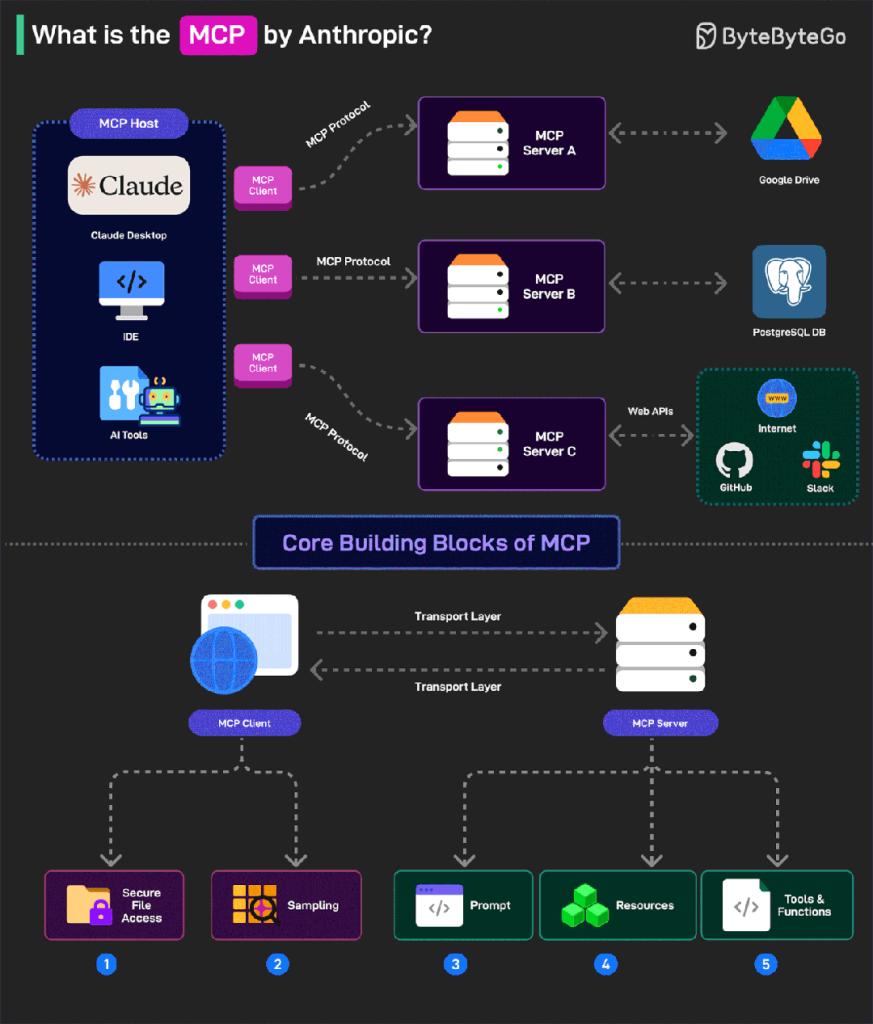
1. MCP Architecture
MCP adopts a client–server architecture with several core components:
- MCP Hosts
- Role: Applications that need access to data, such as Claude Desktop, IDEs, or AI tools.
- Function: They serve as the entry points of the MCP ecosystem, providing AI capabilities to users and acting as a bridge between users and AI models.
- MCP Clients
- Role: Protocol clients that maintain one-to-one connections with MCP servers.
- Function: They handle communication details, ensuring smooth data transfer between hosts and servers for efficient interactions.
- MCP Servers
- Role: Lightweight programs that expose specific functions through the standardized Model Context Protocol.
- Function: Servers are the core of MCP, connecting AI models with real data sources, enabling models to access and operate on data.
- Data Sources
- Local sources: Files, databases, and services on the user’s computer, securely accessible by MCP servers.
- Remote services: External systems available via the internet (e.g., APIs), which MCP servers can connect to, thereby extending the model’s capabilities.
2. Advantages of MCP
- Uniformity: Provides a standardized protocol so that different AI models can connect to data sources and tools in a consistent way, avoiding platform dependency.
- Security: Ensures safer data transmission and access—sensitive data can remain local rather than being fully uploaded to the cloud.
- Flexibility: Supports integration of diverse data sources and tools, whether local or remote, making it easy to embed into AI applications.
- Rich ecosystem: With broad adoption, developers can leverage existing MCP servers and tools to quickly build and deploy AI applications.
3. Summary
Through its client–server architecture and standardized protocol, MCP provides an efficient, secure, and flexible solution for integrating LLMs with external tools and data sources. It not only solves compatibility issues across different models and tools but also offers developers a rich ecosystem that simplifies and accelerates AI application development and deployment.
Core Technology 8: A2A (Agent-to-Agent)
1. Why A2A?
It is becoming increasingly clear that the future of Agentic AI will involve multiple AI agents. These agents will collaborate remotely, and each may be built on different AI agent frameworks (e.g., Spring AI Alibaba, LangGraph, AutoGen, CrewAI, Agent Development Kit, etc.).
This introduces three inherent problems:
- AI agent systems implemented with different frameworks do not support the transfer or exchange of system states.
- Remote AI agents are also unable to transfer system states between each other.
- Offline AI agents do not share tools, context, or memory (including system state).
2. A2A Solution
A2A is an open protocol that provides a standardized way for AI agents to collaborate, regardless of the underlying development framework or vendor.
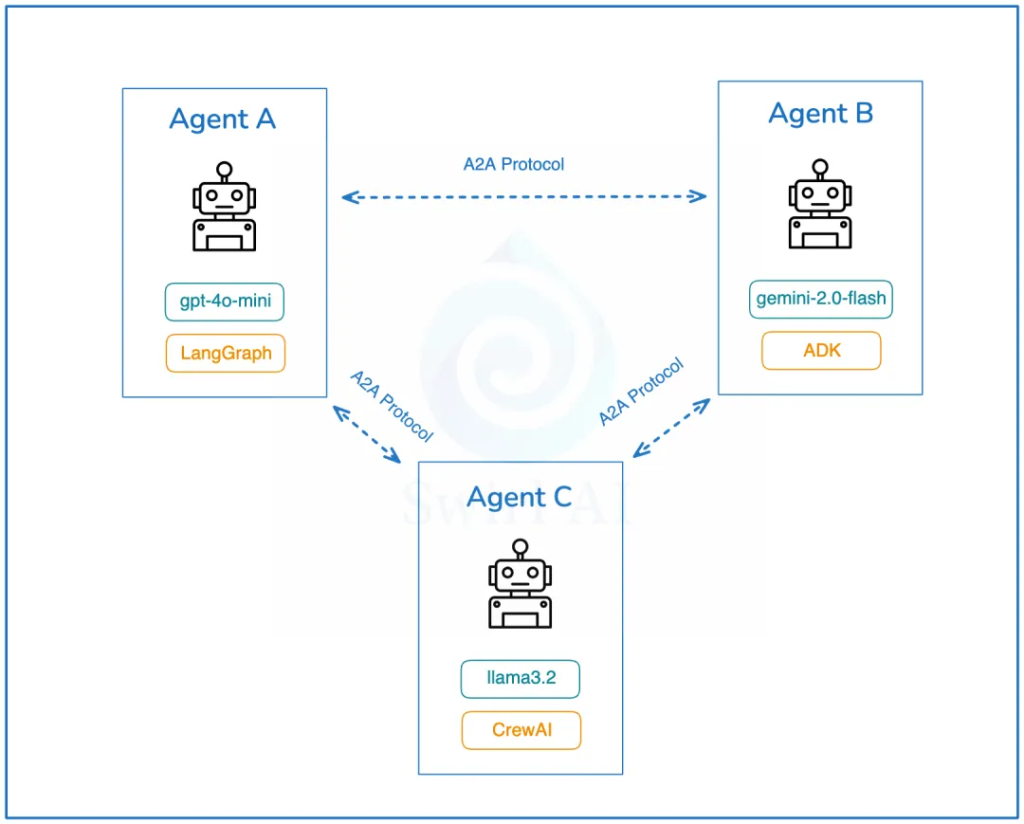
According to Google’s official documentation, the A2A protocol facilitates communication between “client” AI agents and “remote” AI agents. In simple terms, a client agent creates a task and communicates with a remote agent, expecting it to perform certain work or return data.
3. A2A Architecture Design
- Capability Discovery: All AI agents implementing A2A expose their capability catalogs through an Agent Card. This helps other agents discover potentially useful functions offered by a given agent.
- Task Management: The communication protocol makes it easier to handle both short-term and long-term tasks. It ensures that collaborating agents remain synchronized until the requested task is completed and the response is returned. This is important because some agents may require a long time to complete work, and currently, there is no universal standard for how to wait for such tasks.
- Collaboration: AI agents can send messages to each other to convey context, responses, artifacts, or user instructions.
- User Experience Negotiation: A particularly interesting feature—this allows negotiation of the format of returned data (e.g., image, video, text) to align with user interface expectations.
The discovery of AI agents exposed via A2A is an important topic. Google recommends storing an organization’s Agent Card in a unified location, for example:
https://<DOMAIN>/<agreed-path>/agent.json
This is unsurprising, as Google is in the best position to index all available AI agents globally, potentially creating a worldwide AI Agent directory similar to today’s search engine indexes.
What I like about A2A is its emphasis on not reinventing the wheel and building upon existing standards:
- The protocol is based on popular, well-established standards such as HTTP, SSE, and JSON-RPC, which means easier integration with IT stacks commonly used in enterprises.
- Security by default — A2A is designed to support enterprise-grade authentication and authorization, comparable to the authentication schemes used in OpenAPI.
Core Technology 9: AG-UI (Agent User Interaction Protocol)
As AI agents become more widely adopted in enterprises, new communication standards have emerged: MCP addresses the standard for communication between agents and tools, while A2A addresses the standard for communication between agents themselves. However, one key piece is still missing: a communication protocol between users and AI agents.
AG-UI allows you to easily integrate AI assistants, AI customer service, and intelligent Q&A interfaces into websites, apps, applications, or embedded devices—without the hassle of repeatedly developing basic functions for each application or dealing with complex interaction logic. AG-UI completes the AI protocol stack by focusing on building a bridge between AI agents and user front-ends.
It adopts an event-driven design, defining 16 standard events, and supports transmission methods such as SSE, WebSocket, and Webhook. It is compatible with frameworks like LangGraph and CrewAI. In essence, it is like installing an AI “brain” for your front-end: one protocol that meets all interaction needs without binding to any specific model or framework.
1. Why AG-UI is Needed
Each AI agent backend comes with its own mechanisms for tool invocation, ReAct-style planning, state handling, and output formatting. For example, if you use LangGraph, the frontend has to implement custom WebSocket logic, messy JSON formats, and LangGraph-specific UI adapters. But if you migrate to CrewAI or Dify, everything has to be reworked—greatly increasing development effort.
2. AG-UI Architecture Design
AG-UI uses a lightweight, event-driven protocol to connect AI agents and frontend applications. The architecture is illustrated as follows:
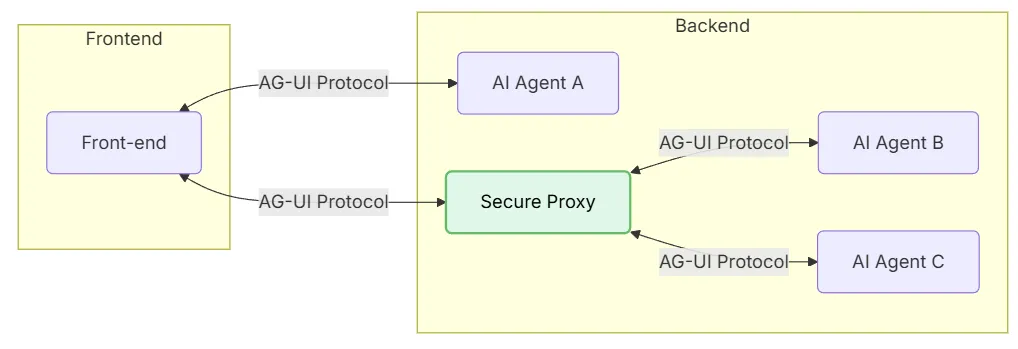
- Front-end: Applications (chat or any AI-enabled app) that communicate via AG-UI.
- AI Agent A: An agent that the front-end can connect to directly, without going through a proxy.
- Secure Proxy: An intermediary that securely routes front-end requests to multiple AI agents.
- AI Agent B and C: Agents managed by the proxy service.
3. AG-UI Working Mechanism
The core working mechanism of AG-UI is both simple and elegant, as illustrated below:
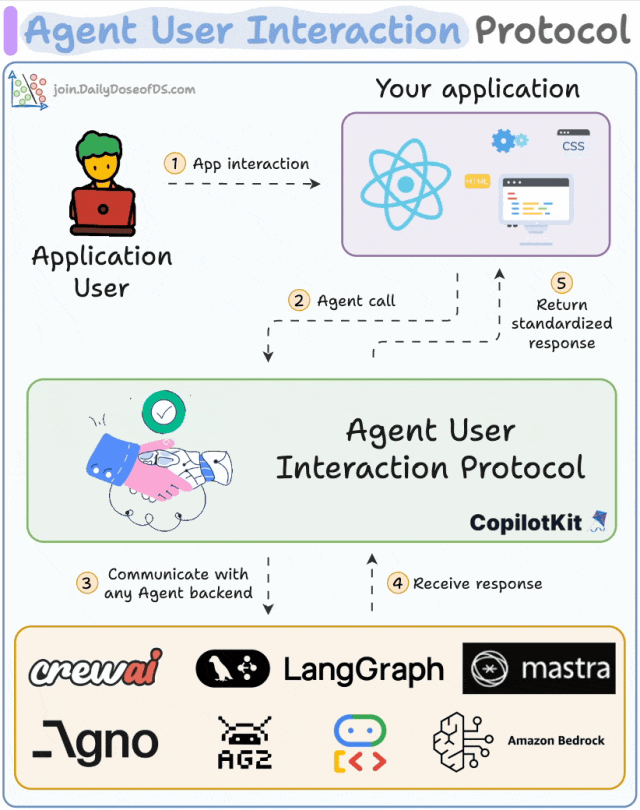
- The client initiates an AI agent session through a POST request.
- An HTTP stream (via SSE, WebSocket, or similar protocols) is then established to listen for events in real time.
- Each event carries a type and metadata.
- The AI agent continuously streams events to the UI.
- The UI updates the interface in real time based on each event.
- At the same time, the UI can also send events and contextual information back to the AI agent for use.
AG-UI is no longer a one-way information flow—it is a truly bidirectional “heartbeat-style” interaction mechanism. Just as REST established the standard for client-to-server requests, AG-UI establishes the standard for streaming real-time AI agent updates back to the UI.
From a technical standpoint, AG-UI uses Server-Sent Events (SSE) to stream structured JSON events to the frontend.